Latest Software Updates | EzManagement - Leading Field Service Software

Software and App update releases and bug fixes

Date: Aug 21, 26

Software & App Feature updates | August 2026

ℹ️ The Quote Value Report will show the Total Quote Value, Pending Value, Won Value, and Lost Value.

Added a Category column to the Quote Status categories, with the values Pending, Won, and Lost.

ℹ️A Contract Details section has been added to display all contract jobs, with a link to view each job. Jobs in the current term will be marked as Current Term in yellow. A View Jobs button has also been added to display all contract jobs in the job list.

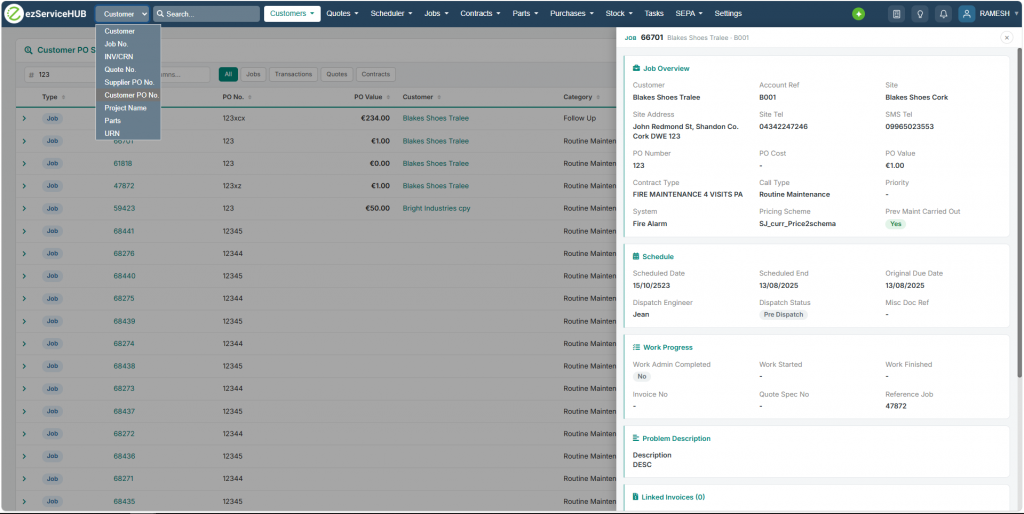
ℹ️Jobs filter added option to filter with Contract ID

ℹ️New Features Notification

A new lightbulb icon has been added to the top navigation bar. When a software update or new feature is released, the icon automatically glows amber with a green dot to let you know something new is available.

Simply click the icon to open the latest release notes in a new tab. Once clicked, the notification clears — just for your account. Other users will continue to see the notification until they view it themselves.

ℹ️Task Board & Settings — Features

Sort Level

  • All Columns (Board) — apply one sort order across every column
  • Specific Column — override sort for individual columns independently; columns with an override are visually flagged

Sort Fields

  • Manual Arrangement — drag and drop card ordering
  • Date Created — when the task card was added
  • Date Last Updated — most recently modified first
  • Customer Name — alphabetical by customer
  • Responsible Person — alphabetical by assigned user
  • Follow-up Date — nearest upcoming follow-up first
  • Quote Number (quote boards only) — newest quote number first
  • Quote Date (quote boards only) — date the task or quote was raised

Sort Direction

  • Ascending ↑ or Descending ↓ toggle per sort field

Actions

  • Apply Sort — saves and reloads the board immediately
  • Clear Override — removes the column-level override, falls back to board-level sort
  • Cancel — closes without saving


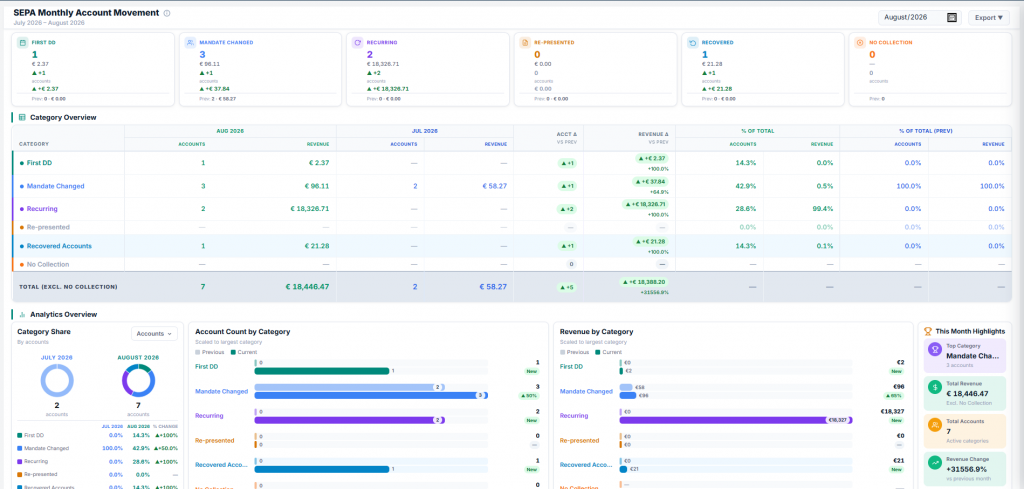
ℹ️SEPA Monthly Account Movement Summary — new report with First DD, Recurring, Re-presented, New Mandate and Failed rows plus drilldown drawer

Drill-down Drawer

  • Slides in from the right on row click
  • Kendo Grid showing individual accounts for that category
  • Columns: AccountRef, Customer, Mandate ID, IBAN, amount
  • Client-side search filter (AccountRef, Customer, Mandate ID, IBAN)

Chart

  • Bar chart + Pie chart toggle
  • Switch between Accounts view and Revenue view
  • Animates on load

Exports

  • Summary only (Excel)
  • Single category detail (Excel)
  • All categories — one sheet per category (Excel)
  • Combined — Summary + 5 category sheets in one file (Excel)

Filters

  • Month / Year selector
  • Load button to refresh data