Call Today:




Many field service businesses still rely on paper forms because they feel familiar. Engineers know how to fill them out, office staff know where they are meant to go, and managers assume the process is good enough because it has been around for years. That logic is comforting, but not especially useful. Paper forms may be familiar, yet they are also slow, fragile, difficult to track, and far too dependent on people remembering to do everything perfectly.
For service companies managing maintenance visits, inspections, repairs, compliance checks, installations, and customer sign-offs, forms are not a small part of the workflow. They sit at the centre of it. They record what happened onsite, what was checked, what was found, what needs to happen next, and whether the work can be evidenced later. When that information is delayed, incomplete, or lost, the business pays for it through wasted admin, billing delays, weaker compliance records, and lower productivity.
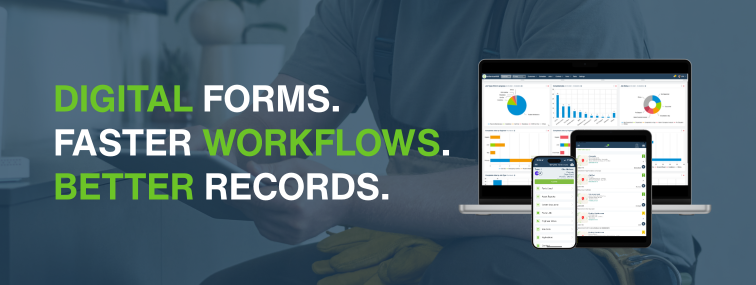
That is why more service businesses are moving from paper job sheets and inspection forms to digital forms. EZ Management supports this through mobile forms with checklists software, the native app for field service engineers, and connected tools such as jobs and field worker tracking software and service job scheduling software. Together, these help field teams capture information onsite and return it to the office faster, with less paperwork and more visibility.
If you are comparing paper forms with digital forms for field engineers, the real question is not which one people are used to. It’s which one gives the business better control over cost, compliance, and productivity?
What paper forms still do well
Paper forms are not popular by accident. They do have a few obvious strengths. They are simple to hand out, do not depend on battery life, and feel easy for teams that have always worked that way. In some environments, paper can also look reassuringly tangible. People can hold it, sign it, file it, and pretend that because it exists physically, it must therefore be under control. A touching belief.
Paper forms can work reasonably well when:
- the business is very small
- job volumes are low
- there is little need for rapid office visibility
- compliance records are straightforward
- engineers rarely need to attach photos or additional evidence
The problem is that most service businesses do not stay in that simple state for long. As job volumes increase, teams grow, compliance requirements become stricter, and customers expect quicker updates, paper forms start to create more friction than value.
Where paper forms start to break down
The main weakness of paper is not that engineers cannot use it. The weakness is that paper creates delays and blind spots across the rest of the workflow. A form may be completed onsite, but the office often does not see it until much later. By then, the business may already be dealing with the consequences.
| Paper form issue | Operational consequence |
| Handwriting is unclear or incomplete | Office staff have to guess, chase clarification, or enter the wrong information |
| Forms are returned late | Invoices, follow-up work, and reporting are delayed |
| Pages are lost or damaged | Evidence of work may be incomplete or unavailable – delayed cashflow as not handed in on time |
| Photos and signatures are handled separately | Records become fragmented and harder to verify |
| Checklists are filled in inconsistently | Compliance records become harder to rely on |
| Office staff re-key data manually | More admin time and more opportunity for error |
This is where digital forms start to show their advantage. They do not just replace paper. They shorten the gap between what happened onsite and what the business can act on in the office.
How digital forms change the workflow
Digital forms allow engineers to capture information onsite and sync it back into the wider service process more quickly. According to EZ Management’s mobile forms with checklists software page, field staff can collect on-site data, including details, images, and signatures, with information syncing back to the back office in real time. That matters because the real value of digital forms is not the form itself. It is what happens after the form is completed.
Instead of waiting for paper to return, the office can see what happened sooner. That can trigger the next step in the workflow, whether that means raising an invoice, scheduling follow-on work, reviewing a failed inspection, ordering parts, or answering a customer query with actual information rather than a creative guess.
Digital forms are especially useful when paired with the native app for field service engineers, which EZ Management describes as a way to simplify on-site job completion for field technicians and engineers, and with jobs and field worker tracking software, which provides real-time visibility of jobs and fieldworkers. In practice, that means digital forms become part of a connected workflow rather than an isolated document.
Cost: the hidden expense of paper forms
When companies compare paper and digital forms, they often look only at the visible cost. Paper appears cheap because each individual form costs very little to print. That is a misleading comparison. The real cost of paper lies in the admin around it.
Paper forms often create hidden costs through:
- printing and storage
- manual filing and retrieval
- admin time spent entering data into other systems
- delayed invoicing
- repeat calls to engineers for clarification
- missed billable items
- lost evidence when forms are incomplete or misplaced
Digital forms do not eliminate all costs, but they usually reduce wasted effort around the form. The office does less re-keying, less chasing, and less hunting through folders or vehicle cabins for a sheet that should have come back two days ago.
| Cost area | Paper forms | Digital forms |
| Form completion | Quick to write, but quality varies | Structured completion improves consistency |
| Data returned to office | Delayed until the paperwork is handed in | Can be returned much faster through the app |
| Data entry | Often re-entered manually | Less duplication across the workflow |
| Record retrieval | Slower to locate and verify | Easier to search when stored properly |
| Evidence handling | Photos and signatures often separate | Can be attached within one record |
| Follow-up work | Slower to trigger | Faster visibility supports quicker action |
Paper may still look cheaper on the stationery line. It tends to look much less clever once you include admin labour, delayed billing, and wasted time.
Compliance: better records, better evidence, better control
Compliance is one of the strongest arguments for moving to digital forms, especially for service businesses working in fire and security, electrical, HVAC, facilities, catering equipment, lifting equipment, or any environment where inspections, maintenance checks, and service records matter.
HSE’s guidance on inspection and maintenance makes two points that are especially relevant here: inspection results should be recorded, and records kept in electronic form should be held securely and made available when required. That supports a simple standard for field forms. Records need to be complete, secure, and retrievable.
The HSE guidance on lifting equipment also highlights reporting and record-keeping obligations under LOLER. Even where a business is not working directly under that regulation, the wider lesson still applies: if work must be evidenced, the quality and accessibility of the record matters.
Digital forms can strengthen compliance by making it easier to:
- standardise checklists across engineers and jobs
- require mandatory fields before submission
- attach images and signatures to the same job record
- timestamp updates more clearly
- store records in a way that is easier to retrieve later
- reduce the chance of missing pages or incomplete job sheets
The ICO’s records management guidance also stresses the value of a robust information management framework for proper record keeping and management. Field service companies are not public authorities, but the logic still translates. If your record system is messy, your ability to prove what happened is weaker than it should be.
Productivity: where digital forms help engineers and the office
Productivity is often discussed as if it only concerns engineers in the field. It does not. A weak form process slows down both the engineer and the office team. Paper forms can be quick to jot down, but they often create rework later. Somebody has to read them, interpret them, type them in, file them, and chase missing details.
Digital forms can improve productivity in several ways:
- engineers complete structured checklists more consistently
- photos and signatures can be attached immediately
- the office receives job information sooner
- follow-on jobs can be raised faster
- billing can move forward without waiting for paper returns
- managers gain visibility of job progress earlier
EZ Management’s broader field service workflow reflects this connected approach. Its service job scheduling software supports job assignment and customer updates, while jobs and field worker tracking software provides real-time location tracking for better oversight. When digital forms feed into that wider process, the business spends less time waiting for information and more time acting on it.
Productivity does not improve because a form is digital by magic. It improves when the information on that form becomes easier to use across the rest of the service workflow.
When paper forms still make sense
There are still situations where paper forms may be used, especially in smaller businesses with lower job volumes or in specific environments where digital adoption is still in progress. Some teams may also need a staged transition rather than an immediate full switch.
Paper may still be workable when:
- the business has very low form volume
- records do not need rapid retrieval
- there is little operational dependency on real-time updates
- the form is temporary or highly specialised
Even then, the question is whether paper is genuinely the better choice or simply the older one. Those are not the same thing.
When digital forms are the stronger option
Digital forms are usually the better choice when the business needs speed, consistency, visibility, and stronger records. That becomes even more important when engineers are completing inspections, collecting evidence, raising follow-on work, or working across multiple sites each day.
| Best fit scenario | Paper forms | Digital forms |
| Low-volume, simple admin | Can be adequate | Still useful, but not always essential |
| Recurring service visits – faster billing is huge benefit | Can become hard to manage consistently | Better for standardised checklists and faster updates |
| Compliance-heavy work | Higher risk of incomplete or hard-to-find records | Stronger control over completeness and retrieval |
| Photo and signature evidence | Often handled separately | Easier to attach within the same workflow |
| Faster invoicing and follow-up | Slower because paperwork must return first | Quicker because data reaches the office sooner |
| Growing service team | Becomes harder to scale cleanly | More suitable for structured growth |
How EZ Management helps businesses move beyond paper
EZ Management is built to help service businesses reduce paperwork and improve information flow between field engineers and the back office. Through mobile forms with checklists software, engineers can collect site information, images, and signatures digitally. Through the native app for field service engineers, field teams can complete jobs more simply on-site. Through ezPro and ezLite, businesses can connect those forms to the wider scheduling, dispatch, and job management process.
That means digital forms are not just replacing paper sheets. They are helping to create a more connected service workflow, where job information is easier to complete, return, and use.
Final thoughts
Paper forms are familiar, but familiarity is not the same as efficiency. For many field service businesses, paper creates hidden costs, slower admin, weaker visibility, and poorer control over compliance records. Digital forms give the business a better chance to capture consistent information, attach evidence, retrieve records faster, and move work through the rest of the workflow without unnecessary delay.
If your engineers still complete inspections, service reports, and checklists on paper, the real issue is not whether the form itself works. It is whether the rest of the business can work quickly enough with the information on it.
Want to reduce paperwork and improve field-to-office visibility?
Explore mobile forms with checklists software, the native app for field service engineers, and ezPro to see how EZ Management helps service businesses move from paper-heavy processes to connected digital workflows.