Call Today:




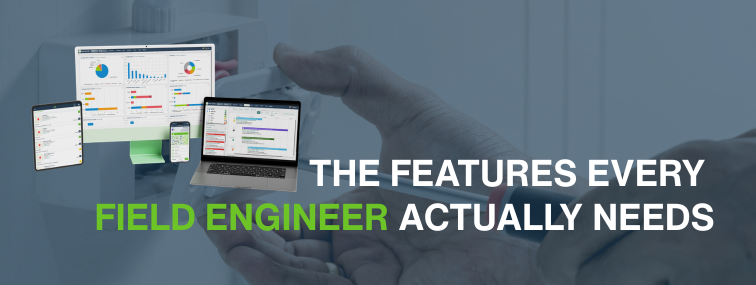
A field service management app should make life easier for engineers. That sounds obvious, yet a surprising number of systems still manage to turn a simple service visit into a small administrative obstacle course. If engineers have to switch between notes, calls, separate photo apps, no service history, paper forms, and half-finished job details, the software is not helping. It is just relocating the chaos onto a screen.
For service businesses, the engineer app is where the real job workflow meets reality. It is where technicians receive job information, complete checklists, capture evidence, update status, search service and asset history, record labour, collect signatures, and feed information back to the office. If that process is slow or incomplete, the whole business feels it. Scheduling becomes harder, customers get weaker updates, invoices are delayed, and managers end up trying to reconstruct the truth from a collection of partial records and optimistic assumptions.
EZ Management supports field teams through the native app for field service engineers, alongside connected tools such as mobile forms with checklists software, jobs and field worker tracking software, asset tracking and maintenance management software, and service job scheduling software. Together, these help engineers complete work onsite with better visibility and less admin drag.
If you are assessing a field service management app for engineers, here is what to look for and why each feature matters in the real world.
Why the engineer app matters so much
The engineer app is not just another feature in a service platform. It is often the main point where office planning, customer expectations, compliance records, and on-site delivery converge. If the app works well, engineers can move through jobs with less friction and the office gets faster, cleaner information. If it doesn’t work well, everyone ends up compensating for it with phone calls, email, paper forms, and guesswork.
This matters operationally and from a safety point of view. HSE’s (Health and Safety Executive (HSE)) guidelines on lone working say employers must manage the risks to lone workers, keep in touch with them, and respond to incidents. For many field service businesses, that makes communication and visibility more than a convenience. It makes them part of responsible management.
What engineers need | Why it matters |
Clear job details | Reduces mistakes, repeat calls, and wasted time onsite |
Offline access | Keeps work moving when connectivity drops |
Digital forms and checklists | Improves consistency and reduces paper-based delays |
Image capture and signatures | Improves evidence, proof of work, and customer sign-off |
Job history and asset records | Gives engineers the context they need before starting work |
Status updates and tracking | Keeps the office informed without endless chasing |
A good app should reduce friction, not merely digitise it.
1. Offline access is not optional in the real world
One of the most important features in a field service management app is offline capability. Engineers do not work only in offices, city centres, or places with flawless signal. They work in basements, plant rooms, rural sites, large industrial estates, service voids, and customer premises where connectivity can drop at exactly the worst time.
When choosing management software, make sure your mobile app is truly mobile — not just browser-based.
Not all mobile apps are created equal. Native apps deliver faster access, better reliability, and a smoother engineer experience.”
A browser shortcut isn’t the same as a dedicated mobile app.
Ofcom continues to publish regular Connected Nations updates on UK mobile coverage and availability, which is a useful reminder that network access is something to plan around, not blindly assume. An app that stops being useful the moment coverage weakens is not a field app. It is a desk app pretending to be helpful.
EZ Management’s field service app pages explicitly highlight offline working. The field service mobile app page states that the app works offline, and the jobs and field worker tracking software page also notes that field workers can continue working when the network connection drops.
Offline access matters because it allows engineers to:
- view job information without relying on live signal
- complete forms and checklists onsite
- record labour, parts, notes, and findings as they happen
- capture signatures and images even when coverage is poor
- sync updates later when the device reconnects
If an engineer has to wait for a signal before completing the basics of the job record, the workflow is already weaker than it should be.
2. GPS tracking should improve visibility, not create theatre
GPS tracking is valuable when it helps the office understand where jobs and engineers stand in real time. It becomes less valuable when it is treated as a novelty map for managers to stare at while nothing else improves.
The best use of GPS tracking is practical. It helps dispatchers understand who is nearest to an urgent call-out, who is likely to be delayed, and how the day is progressing. It also helps improve customer updates because the office is not forced to call engineers repeatedly just to ask where they are.
EZ Management’s jobs and field worker tracking software highlights live GPS tracking and real-time visibility of each engineer and job. That matters because tracking is most useful when it is connected to the actual workflow, not sitting in a separate dashboard no one acts on properly.
Look for tracking features that help with:
- real-time visibility of the engineer’s location
- smarter dispatch for urgent or reactive work
- clearer customer communication
- better understanding of travel versus labour time
- reduced office chasing for basic status updates
Used properly, tracking supports scheduling and communication. Used badly, it just adds a map to the chaos.
3. Digital forms should be built into the app, not bolted on awkwardly
Engineers need to complete records onsite. That includes service checklists, risk prompts, maintenance tasks, inspection notes, test results, and follow-up actions. If they still have to switch to paper or a separate form tool, the process slows down immediately.
HSE’s guidance on inspection records makes an important point here: records do not have to be made in writing, and if they are kept on a computer, they should be held securely and made available on request. That supports the case for digital field records, as long as they are controlled properly and can be retrieved later.
EZ Management’s mobile forms with checklists software is specifically designed to collect onsite data, images, and signatures and sync the information back to the office. That is exactly what a good engineer app should support. Engineers should be able to complete the job record once, at the point of work, without creating duplicate admin later.
Weak forms workflow | Better app workflow |
Paper form completed onsite and returned later | Digital checklist completed within the app |
Office re-types notes into another system | Data is captured once and shared back faster |
Photos and signatures stored separately | Evidence is attached to the same job record |
Missing fields and inconsistent forms | More structured completion and standardised records |
The app should not force engineers into messy workarounds. It should help them complete clean, usable records while they are still on-site.
4. Job history saves time and reduces repeated mistakes
Engineers should not arrive at a site blind. A strong field service app should show previous visits, past faults, outstanding issues, prior recommendations, and anything else that helps the engineer understand what they are walking into.
This is especially important for recurring maintenance work, reactive repairs, and sites with known issues. If the app can provide the service history immediately, the engineer is less likely to repeat unnecessary steps or miss a recurring problem that has already been identified.
EZ Management’s wider service management content emphasises that engineers can receive detailed job briefs, service job and asset histories, and parts information on their mobile phones. That is a good benchmark for what an engineer app should provide. Context matters. Without it, each visit starts from zero, which is a spectacularly inefficient way to run a service business.
5. Image uploads should be simple, fast, and tied to the job
Image capture is no longer a nice extra. For many field service businesses, it is now basic evidence. Engineers need to be able to photograph defects, completed works, access issues, damaged components, serial plates, and other site conditions that support the written record.
The problem with weak systems is that images often end up somewhere else: on the phone gallery, in a messaging app, or in an email thread nobody can find later. That breaks the chain of evidence and makes the record harder to use.
A good field service app should let engineers capture and attach images directly to the job record or related form. EZ Management’s mobile forms with checklists software specifically supports onsite data collection, including images, which is exactly the kind of integrated workflow service businesses need.
Look for image handling that allows engineers to:
- attach photos directly to jobs and forms
- keep images linked to the right site or asset
- avoid separate uploads after the visit
- provide clearer proof of condition and completed work
6. Signature capture should be part of the closing workflow
Customer signatures still matter in many service environments because they help confirm attendance, completion, and acceptance of the recorded work. The value is not just symbolic. A captured signature can support cleaner handover to the office, faster invoicing, and fewer disputes later about what happened onsite.
The best field service apps make signature capture part of the job completion process rather than an awkward extra step at the end. Again, EZ Management’s mobile forms pages refer to collecting signatures digitally onsite, which fits this exact requirement.
Signature capture is most useful when it is combined with:
- job notes
- completed checklists
- timestamps
- images
- clear engineer identification
A signature on its own proves very little. A signature linked to a full digital job record is much more valuable.
7. Asset records give engineers the context to work properly
For maintenance-heavy service businesses, asset visibility is one of the strongest features an app can provide. If engineers can see the asset they are working on, its service history, prior faults, and previous actions, they arrive better prepared and can make better decisions onsite.
EZ Management’s asset tracking and maintenance management software focuses on linking assets, maintenance records, and service history. When that information is available through the field workflow, engineers do not need to rely on office calls, memory, or scattered notes to understand what has happened before.
Asset-linked records are especially useful for:
- planned preventative maintenance
- fire and security assets
- equipment with recurring faults
- sites with multiple serviceable units
- warranty and history checks
When an engineer app includes a strong asset context, the visit starts with information rather than improvisation.
8. The app should reduce office chasing, not depend on it
A strong engineer app should feed useful information back to the office as the day progresses. That means job status, notes, completed forms, labour records, signatures, images, and any follow-up requirements should all move through the workflow with as little manual chasing as possible.
This is where connected systems matter more than isolated features. EZ Management’s service job scheduling software supports job allocation and customer updates, while jobs and field worker tracking software supports real-time visibility. When combined with the engineer app, those tools help reduce the amount of manual communication required to understand what is happening.
If the office still has to call every engineer several times a day for basic progress updates, the app is not doing enough.
What the best field service app looks like in practice
The best app for engineers is not necessarily the one with the longest feature list. It is the one that helps field staff complete real work with fewer delays and better information. That usually means the app should combine core capability in one place: job details, offline access, tracking, forms, images, signatures, history, and asset records.
Feature | Why it matters | What to look for |
Offline access | Keeps engineers working without signal | Ability to view and complete jobs offline, then sync later |
GPS tracking | Improves dispatch and visibility | Live engineer and job status linked to the workflow |
Digital forms | Improves consistency and cuts paper delays | Integrated checklists, notes, and required fields |
Job history | Reduces repeat mistakes and wasted time | Previous visits, faults, and site notes are visible in the app |
Image uploads | Improves proof of work and defect evidence | Direct image attachment to jobs and forms |
Signature capture | Supports clean sign-off and audit trail | Digital signature built into job completion |
Asset records | Gives engineers a better technical context | Asset-linked history, notes, and maintenance data |
How EZ Management supports engineers in the field
EZ Management’s app and related workflow pages are clearly built around practical field use. The native app for field service engineers is designed to help engineers and technicians manage onsite jobs more simply. The field service mobile app page highlights offline access. The mobile forms with checklists software page supports digital forms, images, and signatures. The jobs and field worker tracking software page supports GPS visibility and status tracking. The asset tracking and maintenance management software page supports asset-linked records. And ezPro brings these connected workflows together within a wider field service management platform.
That matters because a good engineer app should not stand alone. It should connect properly to scheduling, service delivery, compliance records, and office visibility.
Final thoughts
A field service management app for engineers should do more than display today’s jobs. It should help engineers work properly onsite, even when the signal is poor, the site is complicated, or the record needs to stand up later under customer, compliance, or management scrutiny.
The most important features are usually the least theatrical: offline access, usable job details, digital forms, GPS visibility, image uploads, signatures, job history, and asset records. Those are the features that reduce repeated calls, weak records, and wasted time across the whole business.
Want an app that helps engineers complete jobs with less friction and better visibility?
Explore the native app for field service engineers, mobile forms with checklists software, jobs and field worker tracking software, and asset tracking and maintenance management software to see how EZ Management helps field teams stay organised onsite and keeps the office better informed.